Katalog Visibility
for WooCommerce.
Hide selected product categories from the Shop page while keeping them fully accessible everywhere else — category archives, direct URLs, search, cart, checkout. For wholesale-only products, pre-launch collections, and funnel-based selling.
One job.
Done cleanly.
WooCommerce gives you category-level visibility on a per-product basis, not a per-category basis. Katalog Visibility fills that gap. Pick categories. Hide them from the Shop page. Everything else continues to work normally.
Wholesale / trade-only products
Keep them off the public Shop page but accessible via direct links you share with trade customers. No paywall, no login required — just clean separation.
Pre-launch collections
Build out a collection before launch day without exposing it to casual shoppers. When you're ready, uncheck the box and publish.
Funnel-based selling
Drive paid traffic to specific category landing pages instead of the generic Shop page. Cleaner attribution, better conversion math.
Members-only products
Pair with the wsvc_hidden_categories filter to show or hide categories based on user role — wholesale customers see different inventory than the public.
Built for stores
that ship daily.
Multi-select picker
Searchable Select2 dropdown listing every product category including nested subcategories.
Selective hiding
Only the Shop page is affected. Category archive pages always show every product they contain.
Search exclusion toggle
Optionally hide selected categories from frontend search results too.
Per-product override
"Force show on Shop page" checkbox on individual products. Hide a category but surface its hero SKU.
Developer filter
wsvc_hidden_categories hook for programmatic control — role-based visibility, A/B tests, anything.
Debug logging
Toggle on to log excluded category and product IDs to WooCommerce Status Logs. Easy to diagnose, easy to switch off.
Safe query merging
Appends to existing tax_query arrays without overwriting other plugins' filters.
HPOS compatible
Declares full compatibility with WooCommerce High-Performance Order Storage.
Lightweight
No external dependencies. No custom database tables. No frontend assets. Pure server-side query filtering.
One hook,
infinite control.
The wsvc_hidden_categories filter lets you modify the hidden category list at runtime. Below: a real example showing wholesale users a category that's hidden from the public.
// Show the "wholesale" category to logged-in wholesale customers
// while keeping it hidden from the public Shop page.

add_filter( 'wsvc_hidden_categories', function ( $hidden ) {
    if ( current_user_can( 'wholesale_customer' ) ) {
        $wholesale = get_term_by( 'slug', 'wholesale', 'product_cat' );

        if ( $wholesale ) {
            $hidden = array_diff( $hidden, array( $wholesale->term_id ) );
        }
    }

    return $hidden;
} );
What it
looks like.
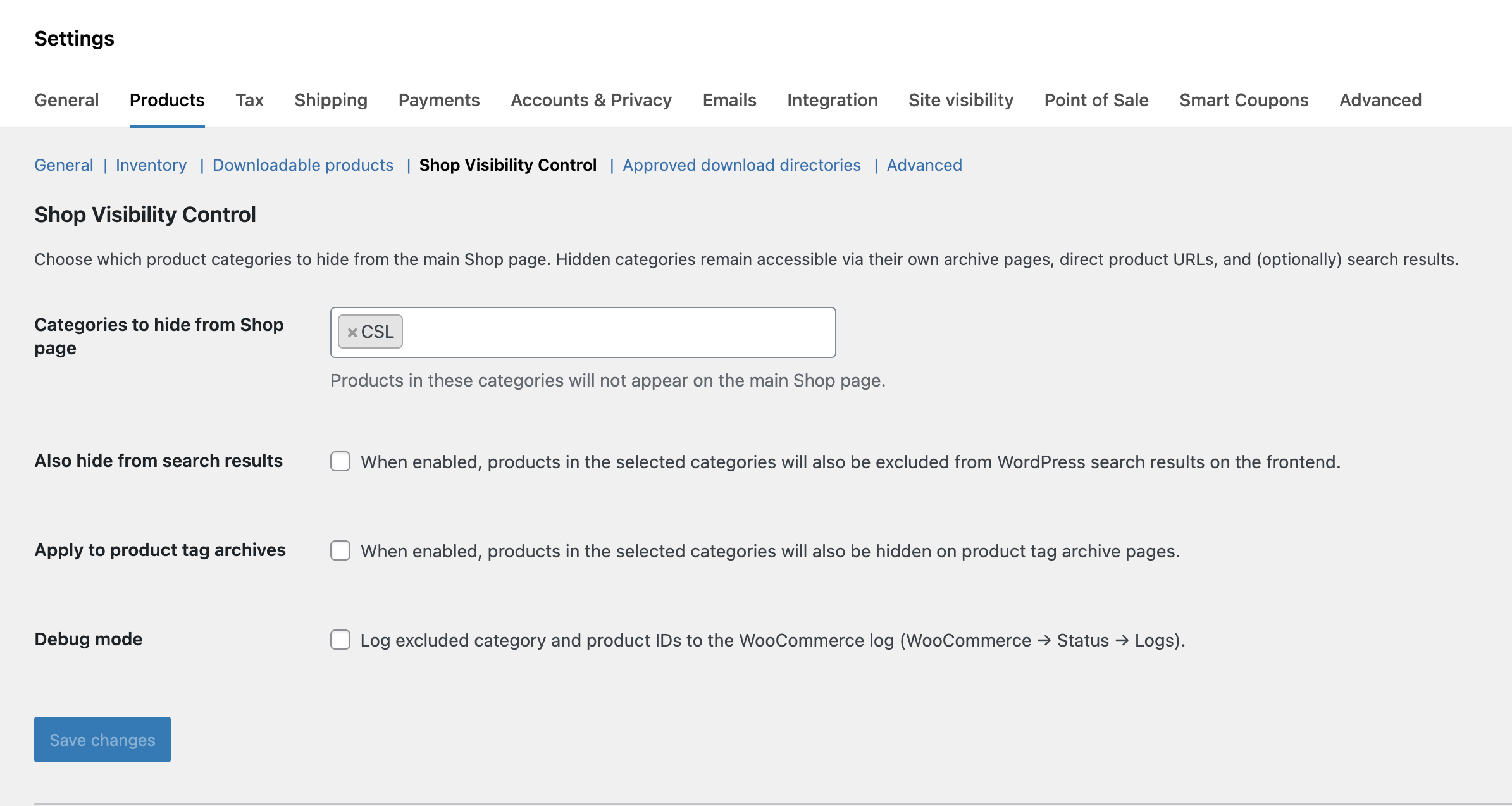
Six steps.
One minute.
From the WordPress.org listing, or use Plugins → Add New search inside your WP admin.
Go to Plugins → Add New → Upload Plugin, choose the zip, click Install Now.
Hit Activate. The plugin is now wired into WooCommerce.
Navigate to WooCommerce → Settings → Products → Shop Visibility Control.
Use the searchable Select2 picker. Toggle the optional search and tag-archive exclusions if needed.
Click Save Changes. Selected categories are immediately hidden from the Shop page on the public frontend.
Alternatively, upload the extracted katalog-visibility-for-woocommerce folder to /wp-content/plugins/ via FTP and activate from the Plugins screen.
Runs anywhere
modern WooCommerce runs.
Quick answers
to common questions.
Will hidden products still appear on their category pages?
Can I still link directly to a hidden product?
Does this affect the admin dashboard or REST API?
Can I hide products from search results too?
Can I override hiding for a specific product?
Is this compatible with WooCommerce HPOS?
Does this work with other plugins that modify product queries?
Is there a paid pro version?
What's changed.
What ships in v1
- Multi-select category hiding from the Shop page
- Optional search result exclusion
- Optional product tag archive exclusion
- Per-product "Force show on Shop page" override
- Debug logging to WooCommerce Status Logs
wsvc_hidden_categoriesdeveloper filter- HPOS compatibility declared
Need WooCommerce work
beyond a plugin?
Shabtech builds custom WooCommerce stores, integrates African and global payment gateways, rescues broken sites, and maintains live stores on retainer. The plugin you just downloaded is one piece of work from a 13-year studio. We do more.